
Experiments in Building an Automatic Software Factory
My project cc-pipeline, what it unlocks for building from scratch, massive re-writes, and lessons.

Here’s a thing you can do in 2026: write a plain-English description of software you want built, run one command, go to bed, and wake up to a working implementation. Full SLDC, spec writing, unit and end-to-end test suite passing, git committed, phase by phase.
(to not bury the lead) here is the repo: https://github.com/timothyjoh/cc-pipeline
That’s the pitch. Now here’s the honest version.
It works. Sometimes really well. But what it actually produces is determined almost entirely by what you put in. Leave something unspecified and the pipeline will make a decision for you — and that decision might be “functional but ugly” or “mechanics intact, polish missing.” The factory metaphor holds: garbage in, garbage out. But with a good spec? The output is genuinely impressive.
This is the story of how I built that pipeline, what I learned from running it a dozen times on projects ranging from an Elixir port to a Kirby platformer, and why I think building your own is more approachable than you’d expect.
2025: Babysitting the Context Window
I spent most of 2025 deep in spec-driven development frameworks. The premise was compelling: instead of chatting at an LLM, you give it a full specification and let it execute against that spec. Several frameworks were doing interesting things here.
BMAD Method gave you a structured way to think about AI-assisted development with roles and phases. GitHub’s Speckit explored spec-first workflows. OpenSpec took a similar angle. Obra’s Superpowers was doing interesting things with structured AI workflows. But my favorite approach was HumanLayer’s three-step research → plan → implement process, Dex’s talks about not-anthropomorphizing matched my intuition about how to break down work cleanly.
The frameworks were working where the models had poor performance in 2025. It was easy to use, but I kept wondering “can I automate some of this?”. Every step required manual intervention. After Claude finished a spec, I had to review/edit the output, start a new context, invoke the next command, and wait. Review it again, ask for fixes. And above all we always had to fix the tests that were over-simplistic, and involved too much mocking.
While it was all easier than ever, the disconnect between waiting 30-40 minutes at each stage and coming back was a huge cognitive disconnect. I wasn’t building software. I was babysitting a context window between gaps in the workday. While this enabled me to be productive with my overly meeting-heavy days, it was still disjointed.
When Anthropic shipped subagents and then Claude Agent Teams, something clicked. Here was a way to have Claude orchestrate its own work across multiple contexts. I spent a week with tmux and Agent Teams, spinning up coordinated multi-agent sessions. The results were promising enough that I made a decision: I was going to automate the SDLC loop itself — not just the build step, but the whole cycle: spec → research → plan → build → review → fix → reflect → commit. I was going to “live with” the agent to make decisions between the phases that I might otherwise be around to make, and then I could come back and correct it later. And I was going to add my own gates — testing passes, reflection checkpoints, a staff-engineer-level code review at each phase. The need was “while I am away, keep building”, then I can come back to something to react-to, and we can start another cycle of correction and polish.
That decision is what became cc-pipeline.
The First Test: Porting OpenClaw to Elixir/BEAM
The first real question wasn’t “can the pipeline build something new?” It was “can the pipeline take an existing, non-trivial codebase and rewrite it in a different language?”
I’d already written about attempting this on a company project (see my previous post on Substack) with moderate success. I tried an automatic approach using subagents and agent teams, and while it announced “Success, it is done”, my savvy readers will know better than to trust Claude on a multi-hour run that it did everything it was asked.
The target for the pipeline test was ambitious: porting OpenClaw — the open-source AI gateway I run my own agent on — to Elixir and the BEAM platform. This wasn’t random. I’ve been circling Elixir for years. The BEAM VM’s model of millions of lightweight processes, supervision trees, and fault tolerance feels architecturally right for agentic systems. AI eliminates Elixir’s historical barrier (hard to hire for, less training on LLMs), and what remains are its architectural advantages.
Shell Loops, tmux Hell, and the Agent SDK
The earliest version of the pipeline was a bash script. A loop over phases, with a call to claude -p at most steps. Pipe the spec in, capture the output, write it to disk, move to the next step. It worked, easily I might add.
The first real problem: some steps need Claude Code’s interactive mode. The review and build steps in particular benefit from Claude having full filesystem access, access to the project’s CLAUDE.md and any custom skills you want to add, the ability to run commands, write and execute tests. claude -p is non-interactive, it takes a prompt and returns output, like a function call. But claude (interactive) is a full REPL session.
The first users of Claude Agent Teams said the answer was tmux. Launch a tmux session, start claude in it, send the prompt via send-keys or paste-buffer, wait for it to finish, detect completion, exit cleanly. Sounds reasonable.
The timing problems alone were maddening. send-keys would fire before the Claude session was fully initialized and the prompt would vanish. Or it would land but never submit. paste-buffer had truncation issues with long prompts. Detecting completion was even harder, there’s no clean signal when Claude Code is done with a task, so I was polling for sentinel files, watching for specific output patterns, putting “wait” timers all over the place.
And then getting Claude to exit cleanly to reset the context (which is the whole point, a fresh context window per step) that was its own adventure. Send /exit. Wait. Send Escape. Wait. Send Enter. Hope. Repeat.
I burned days on this. The tmux approach never got reliable enough to trust overnight.
The solution was staring at me the whole time, and it was the Claude Agent SDK. Instead of trying to automate an interactive terminal session, I could control Claude Code programmatically: pipe the prompt to stdin, capture structured output from stdout, and get a clean process exit when the work is done. Each pipeline step gets a fresh context window, automatically. No timing hacks, no tmux polling, no sentinel files. AND the Agent SDK allows me to use my Claude Max subscription, because it is not harnessing the API directly, but through Claude Code CLI.
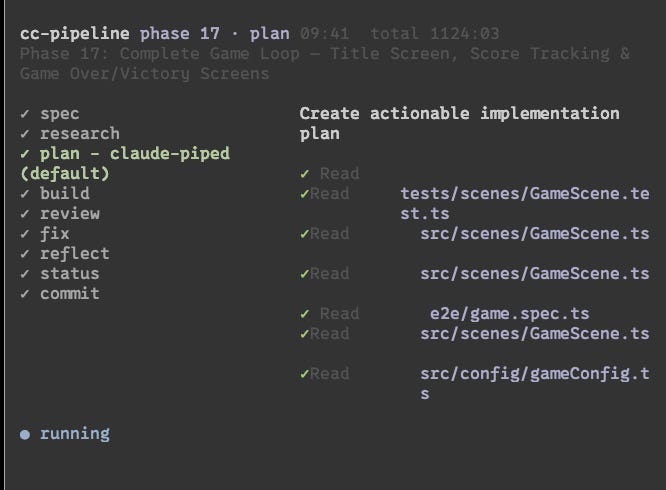
And with structured output came structured logging. Which meant I could build a TUI — a terminal dashboard showing which phase and step is running, recent events, progress through the workflow. Instead of a black box running overnight, you can actually watch it work.
The Experiments
Swimlanes × 2
I built the Swimlanes project twice — once in Astro 5 with React islands and SQLite, once in Ruby on Rails. Both times from the same basic concept: a Trello-like kanban board for taking notes, simple.
Both runs produced functional software. Solid test coverage, drag-and-drop working, data persistence, the whole spec. If you squinted at it as a backend engineer, it was fine.
The UI was rough. Not broken, but developer-designed. Both implementations had that slightly-off quality of software that was never told what it should look like. Which makes sense, because we never told it to use a design framework or UI library beyond specifying tailwind CSS. The BRIEF.md specified features and data model but said nothing about design system, component library, visual style, or aesthetic direction.
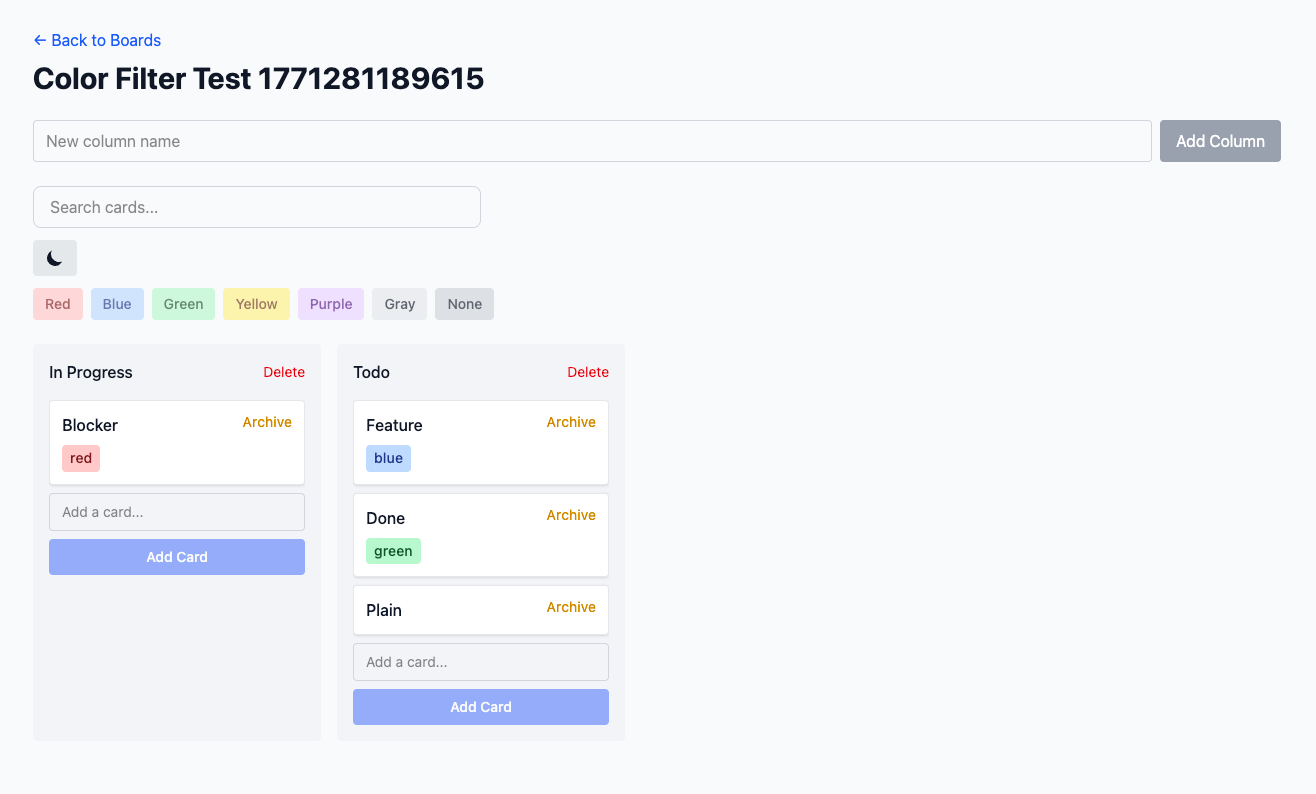
The lesson wrote itself: if you don’t specify the design, the pipeline designs something for you. And “something” is not the same as “good.” A single line in the brief — “use Tailwind with the Shadcn component library, clean minimal aesthetic with neutral grays” — would have changed the output dramatically.
Sales Performance Statistics in R
This one I’m proud of, partly because it surprised me.
I’ve never written R in my life. I know what it is, I know roughly what it does, I’ve never typed an R expression. The brief was simple: given a set of sales rep performance data, build a statistical analysis and a formatted report.
I co-wrote the BRIEF.md with Claude — iterated on what “sales performance analysis” should actually mean, what metrics mattered, what the report should communicate. Then kicked off the pipeline and walked away.
It generated its own dummy data, ran the statistical calculations, and designed a report layout. When I came back, I had a working R project — reproducible, documented, producing output that looked like what I’d described. I didn’t struggle with the language. I didn’t have to learn the ecosystem. I described what I wanted and the pipeline figured out the R-specific implementation details.
That’s the part that’s hard to communicate until you’ve seen it: domain knowledge barriers dissolve when the spec is clear. You don’t need to know R to get R code. You need to know what you want.
Tetris × 2
Tetris was the control experiment. Two runs, identical BRIEF.md, different pipeline runs.
Play it here: https://tetris-3d-pipelined.vercel.app/
Code here: https://github.com/timothyjoh/tetris-3d-pipelined
The results were slightly divergent. Not dramatically — both games were recognizably Tetris, both had the core mechanics, both ran in the browser. But small differences emerged: slightly different scoring logic, slightly different color palette, slightly different keyboard handling. Nothing alarming. Nothing that suggested the pipeline was unreliable.
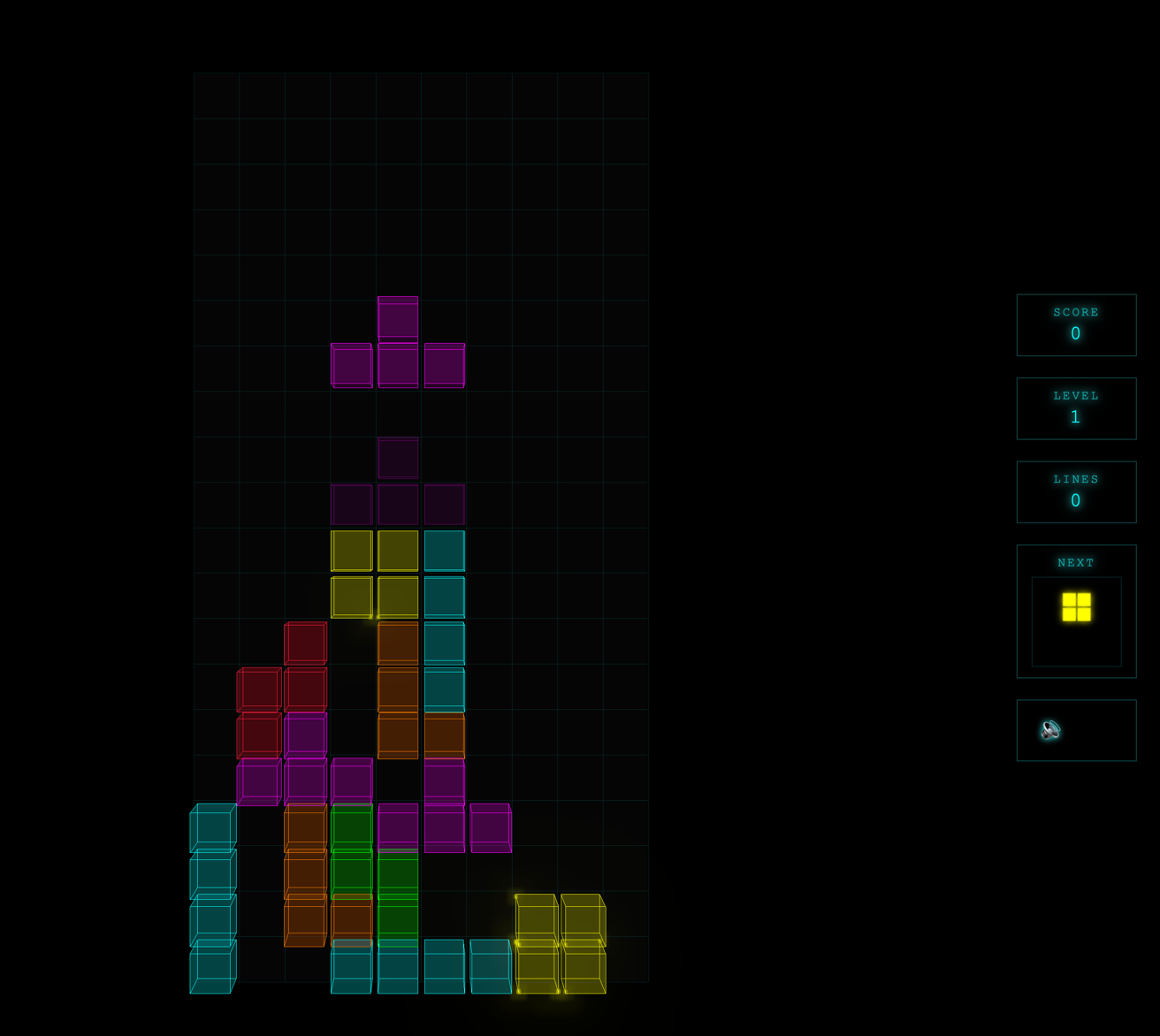
My read on why it worked so well: Tetris is one of the most-implemented games in history. Every LLM has seen hundreds of Tetris implementations in its training data. The shape of the problem is well-understood. This matters more than people realize. When you give the pipeline a well-known problem with clear mechanics, it has deep pattern-matching to draw on. The brief is almost a formality.
Which is also a warning: the pipeline’s ceiling is not the pipeline, it’s the training data PLUS the specifications you give it. Give it a well-documented problem and it flies. Give it something novel or ambiguous and it’ll still build something, albeit you will put in more work later.
Kirby Your Enthusiasm
This was the ambitious one. A 2D platformer starring Kirby as Larry David, navigating LA street encounters in the style of Curb Your Enthusiasm. Full Phaser 3, TypeScript, three acts, character absorb mechanics, Curb NPC dialogue encounters. The brief was detailed and the concept was delightful.
Here’s the honest report: the mechanics mostly work. Kirby moves. Kirby floats. The inhale mechanic functions. The act structure is there.
The look is rough. Kirby is a pink circle. The enemies are rectangles. The backgrounds are solid colors. It looks like a prototype demo, not a game you’d actually play.
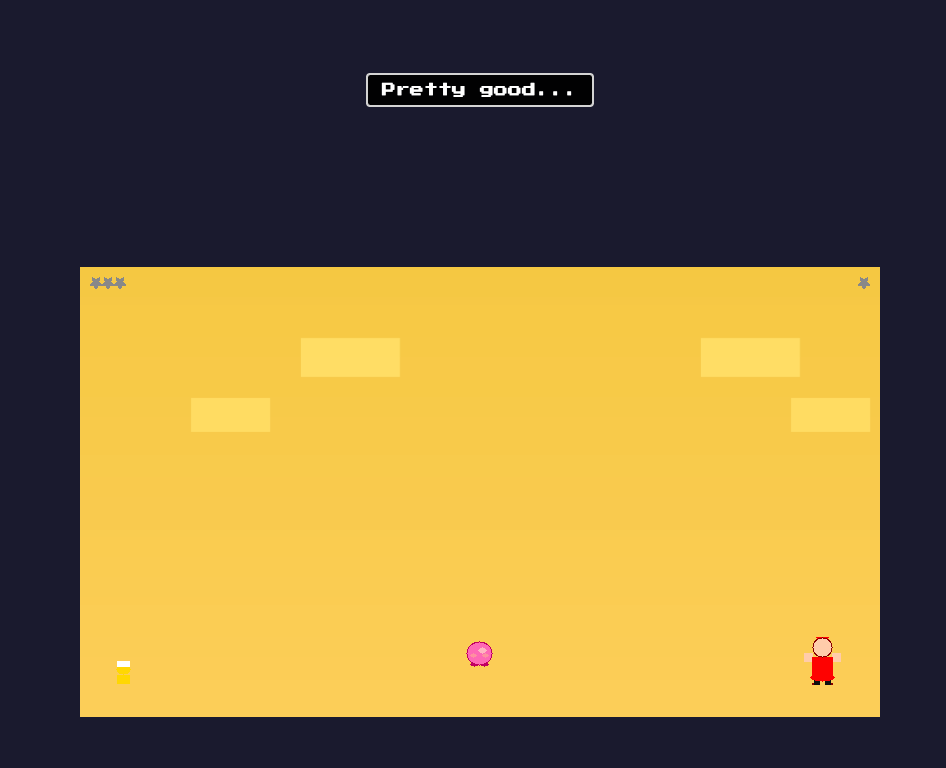
Part of this is inherent to the problem: game art is hard to specify in a text brief. But part of it is solvable. The pipeline’s architecture supports additional steps and for game development, one obvious next step would be a design phase that hands off to an image-capable model (Gemini?) to generate sprites and background assets before the build step runs. We haven’t built that yet. When we do, I expect Kirby will look a lot more like Kirby.
The Kirby experiment also surfaced something important about ambitious projects: the pipeline is far better than vibe-coding, but it’s not magic. A sophisticated, well-structured SDLC running through Claude Agent Teams can still produce a rough first pass on a complex, underspecified project. The tool amplifies your judgment, it doesn’t replace it. A professional who leans in, steers the brief toward the hard decisions, and treats the pipeline output as a strong starting point will get dramatically better results than someone who hands it a vague concept and hopes.
How cc-pipeline Works
The idea is simple enough to explain in three steps.
First: init. Run npx cc-pipeline@latest init in an empty repo. It scaffolds a .pipeline/ directory with prompt templates, a workflow.yaml defining the step sequence, and a BRIEF.md.example to show you what a good brief looks like.
Second: write the brief. Open Claude Code in the project and have a conversation:
Using the @BRIEF.md.example as a template, let's discuss this project's goals
and write a BRIEF.md. Ask me for a quick description first, then ask questions
one-at-a-time to build a good brief.
Claude asks you questions. You answer. The brief writes itself. This step matters more than any other. The better the brief, the better everything downstream.
Third: run it and walk away.
npx cc-pipeline runEach phase runs through the same sequence of steps: spec → research → plan → build → review → fix → reflect → status → commit (or add your own). The review step runs a staff-engineer-level critique of the code, I prefer to use codex at this phase, it outputs a REVIEW.md and a MUST-FIX.md file. The fix step addresses any must-fix findings. The reflect step looks back at the phase and plans the next one. Status updates STATUS.md at the project root — a running summary of what’s been built, test coverage, and what’s coming. Then a git commit.
Watch the TUI if you want to see it in motion. Or just read STATUS.md — it’s one of the genuinely fun parts of running the pipeline, watching it document its own progress as it goes.
Don’t miss this: it’s almost entirely customizable. The steps are defined in .pipeline/workflow.yaml. The prompts are markdown files in .pipeline/prompts/. You can add steps, remove steps, reorder them. Want a web research step before build to pull in current documentation? Add it. Want an extra test validation pass after fix? Add it. Want a dedicated design spec step that enforces a component library? Add it. Want to swap out CLIs that execute the steps, also easy.
The pipeline currently includes a built-in agent for Codex as well as the Claude Code agents. I personally run this using my $30/month ChatGPT subscription for the Codex-powered steps, and my Claude Max subscription for everything else. It’s not expensive (10% of my weekly plan for Claude), and you can mix and match however your subscriptions line up.
The Lesson
The most important thing I learned across all these experiments can be compressed to one sentence:
If you leave it unspecified in the brief, it will be handled in a way you didn’t choose.
Sometimes that’s fine — the pipeline makes defaults based on the popularity of the LLM’s training data.
The inverse is also true: cc-pipeline is a genuinely excellent greenfield starting point for any project that’s roughly defined but not fully specified. Run it, get a solid foundation, then iterate. The output of Phase 1 is already more coherent than most “let me just start coding and see what happens” projects. The test suite is there from day one. The code review caught real issues. The architecture reflects the brief. I’ve been able to build some internal tooling here at my work that otherwise would have been a beast to build. Maybe this will be the start of your “I need my own custom CRM” application dreams.
Where it really shines is migrations and ports. “Take this open-source project, keep the A and B parts, drop X Y Z, keep it lightweight” — feed that as a brief, point it at the source repo as a research resource, and the pipeline will not only produce the implementation but will document why it made each architectural decision in the DECISIONS.md and STATUS.md it generates. You learn the codebase by watching it get rebuilt.
The BEAM experiment is my favorite example. I didn’t just end up with an Elixir port. I ended up with a running record of every design decision the pipeline made, in its own voice, at each phase. Reading it is like having a senior Elixir engineer narrate the architecture choices in real time.
The Invitation
The repo is at github.com/timothyjoh/cc-pipeline. MIT licensed. Start with npx cc-pipeline@latest init.
If you want to use it as-is, go for it. Write a brief, run the pipeline, see what comes out.
If you want to build your own, that’s the point. The pattern is simple: a loop over phases, with a configurable set of steps, and a prompt template at each step. The intelligence lives in the prompts and the brief. The engine is just plumbing. You could build a version of this in a weekend that’s tuned exactly to how your team works, your own SDLC, your review criteria, your testing standards, your design system enforcement.
The factory is more approachable than it looks. You just have to decide what it should build, and tell it so.
I can’t wait to see what others derive from this, and what they ship. Please leave me a message on Twitter at https://x.com/timojhnsn if you find this useful.